
Most AI apps die quietly. Not because the model was bad, but because nobody could explain what the thing actually did in one sentence.
We’ve watched this play out across dozens of builds. A team wires up a solid LLM backend, ships a chat box, and then wonders why the launch tweet got fourteen likes. Meanwhile, someone else releases a single-purpose tool that turns your LinkedIn bio into a roast, and it does 200,000 sessions in a week.
The gap between those two outcomes isn’t model quality. It’s product judgment.
This app build guide using LLMs walks through what we’ve found actually matters: choosing a use case with built-in demand, designing a shareable output, keeping your unit economics from eating you alive, and shipping before the idea goes stale. No hand-waving just the decisions that separate an experiment from a product.
Why Most LLM Apps Never Reach an Audience
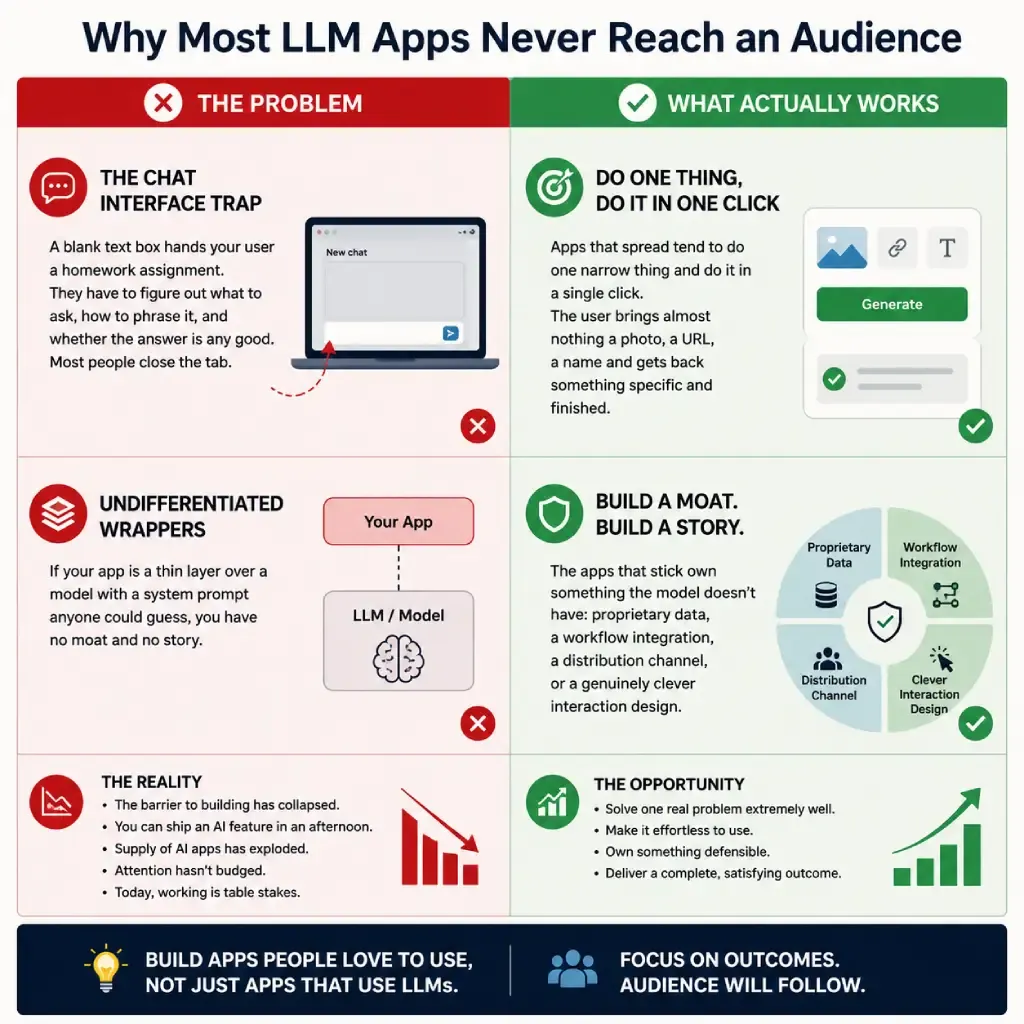
The barrier to building has collapsed. You can stand up a working AI feature in an afternoon now, which means the supply of AI apps has exploded while attention hasn’t budged.
That changes what “good” means. Three years ago, working was impressive. Today, working is table stakes.
The chat interface trap
A blank text box hands your user a homework assignment. They have to figure out what to ask, how to phrase it, and whether the answer is any good. Most people close the tab.
Apps that spread tend to do one narrow thing and do it in a single click. The user brings almost nothing a photo, a URL, a name and gets back something specific and finished.
Undifferentiated wrappers
If your app is a thin layer over a model with a system prompt anyone could guess, you have no moat and no story. The apps that stick own something the model doesn’t have: proprietary data, a workflow integration, a distribution channel, or a genuinely clever interaction design.
Step 1: Pick a Use Case With Native Virality
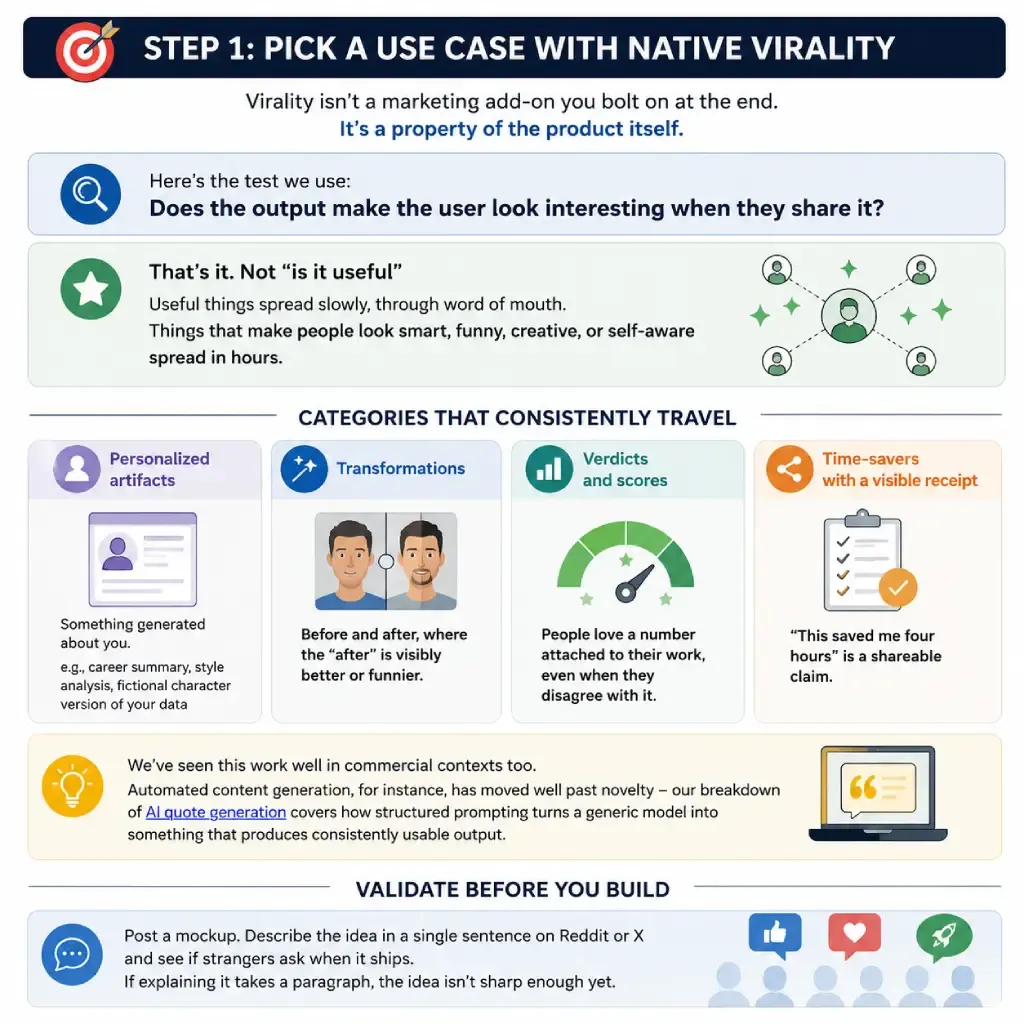
Virality isn’t a marketing add-on you bolt on at the end. It’s a property of the product itself.
Here’s the test we use: does the output make the user look interesting when they share it?
That’s it. Not “is it useful” useful things spread slowly, through word of mouth. Things that make people look smart, funny, creative, or self-aware spread in hours.
Categories that consistently travel
- Personalized artifacts– something generated about you: a career summary, a style analysis, a fictional character version of your data
- Transformations– before and after, where the “after” is visibly better or funnier
- Verdicts and scores– people love a number attached to their work, even when they disagree with it
- Time-savers with a visible receipt— “this saved me four hours” is a shareable claim
We’ve seen this work well in commercial contexts too. Automated content generation, for instance, has moved well past novelty – our breakdown of AI quote generation covers how structured prompting turns a generic model into something that produces consistently usable output.
Validate before you build
Post a mockup. Describe the idea in a single sentence on Reddit or X and see if strangers ask when it ships. If explaining it takes a paragraph, the idea isn’t sharp enough yet.
Step 2: Design the Shareable Moment
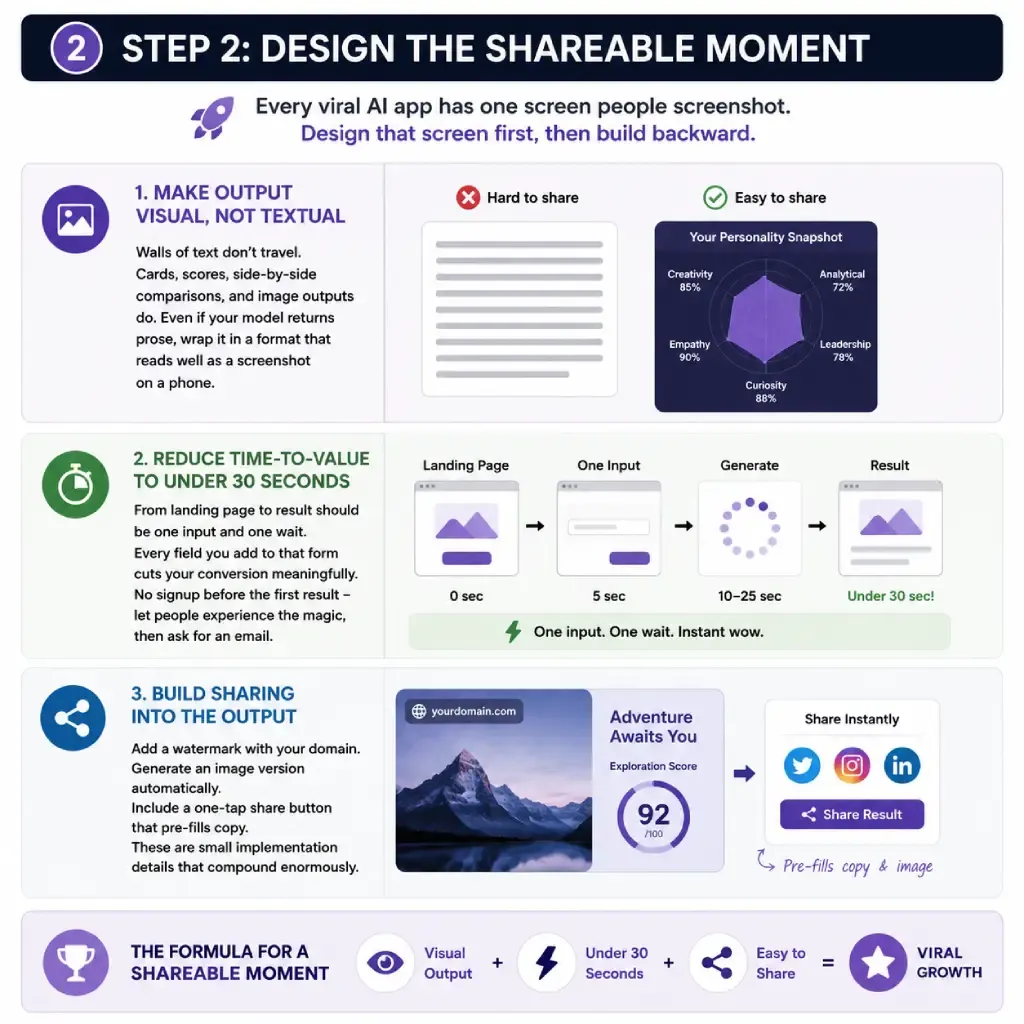
Every viral AI app has one screen people screenshot. Design that screen first, then build backward.
Make output visual, not textual
Walls of text don’t travel. Cards, scores, side-by-side comparisons, and image outputs do. Even if your model returns prose, wrap it in a format that reads well as a screenshot on a phone.
Reduce time–to–value to under 30 seconds
From landing page to result should be one input and one wait. Every field you add to that form cuts your conversion meaningfully. No signup before the first result – let people experience the magic, then ask for an email.
Build sharing into the output
Add a watermark with your domain. Generate an image version automatically. Include a one-tap share button that pre-fills copy. These are small implementation details that compound enormously.
Step 3: Choose Your Stack and Ship Fast
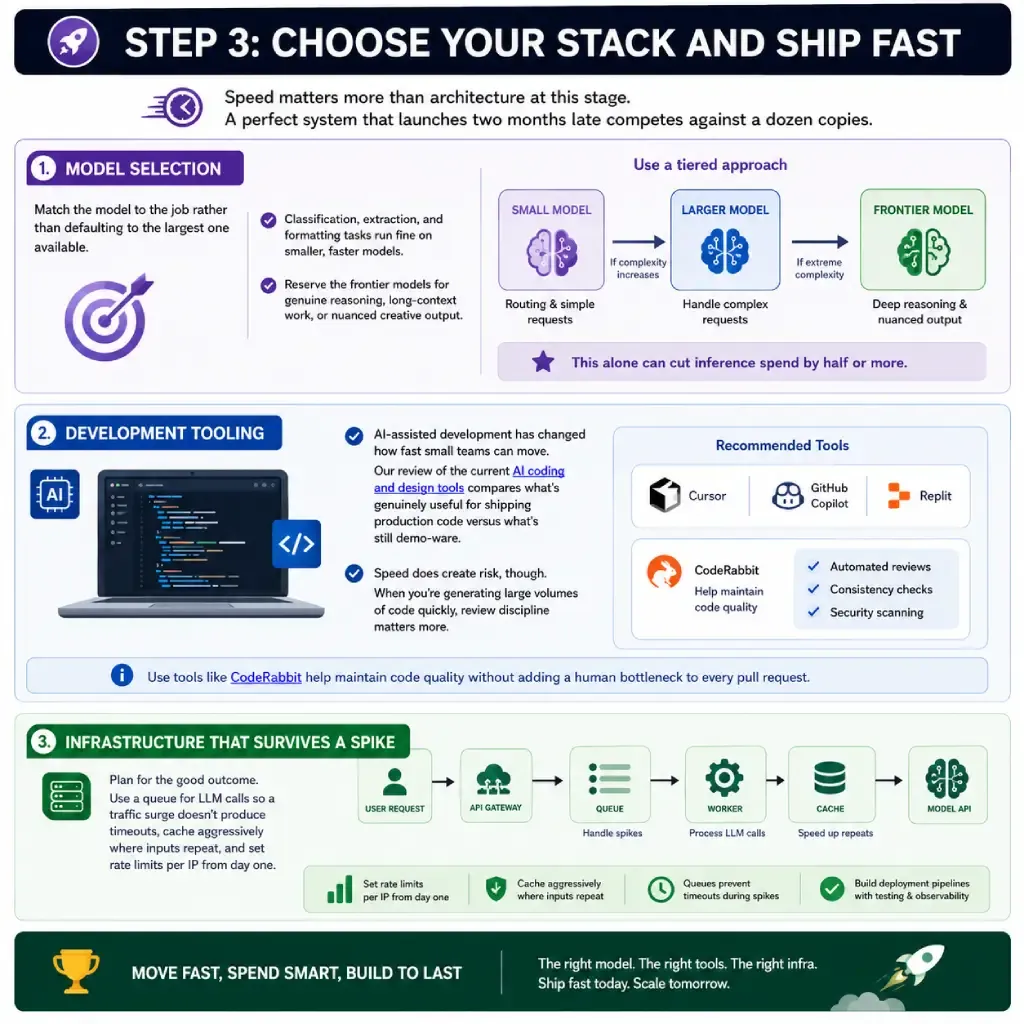
Speed matters more than architecture at this stage. A perfect system that launches two months late competes against a dozen copies.
Model selection
Match the model to the job rather than defaulting to the largest one available. Classification, extraction, and formatting tasks run fine on smaller, faster models. Reserve the frontier models for genuine reasoning, long-context work, or nuanced creative output.
Many production apps use a tiered approach a small model handles routing and simple requests, escalating to a larger one only when complexity demands it. This alone can cut inference spend by half or more.
Development tooling
AI-assisted development has changed how fast small teams can move. Our review of the current AI coding and design tools compares what’s genuinely useful for shipping production code versus what’s still demo-ware.
Speed does create risk, though. When you’re generating large volumes of code quickly, review discipline matters more, not less automated review tools like CodeRabbit help maintain code quality without adding a human bottleneck to every pull request.
Infrastructure that survives a spike
Plan for the good outcome. Use a queue for LLM calls so a traffic surge doesn’t produce timeouts, cache aggressively where inputs repeat, and set rate limits per IP from day one. For teams building serious deployment pipelines, our harness engineering guide covers the testing and orchestration layer in depth.
Step 4: Control Token Costs Before They Control You
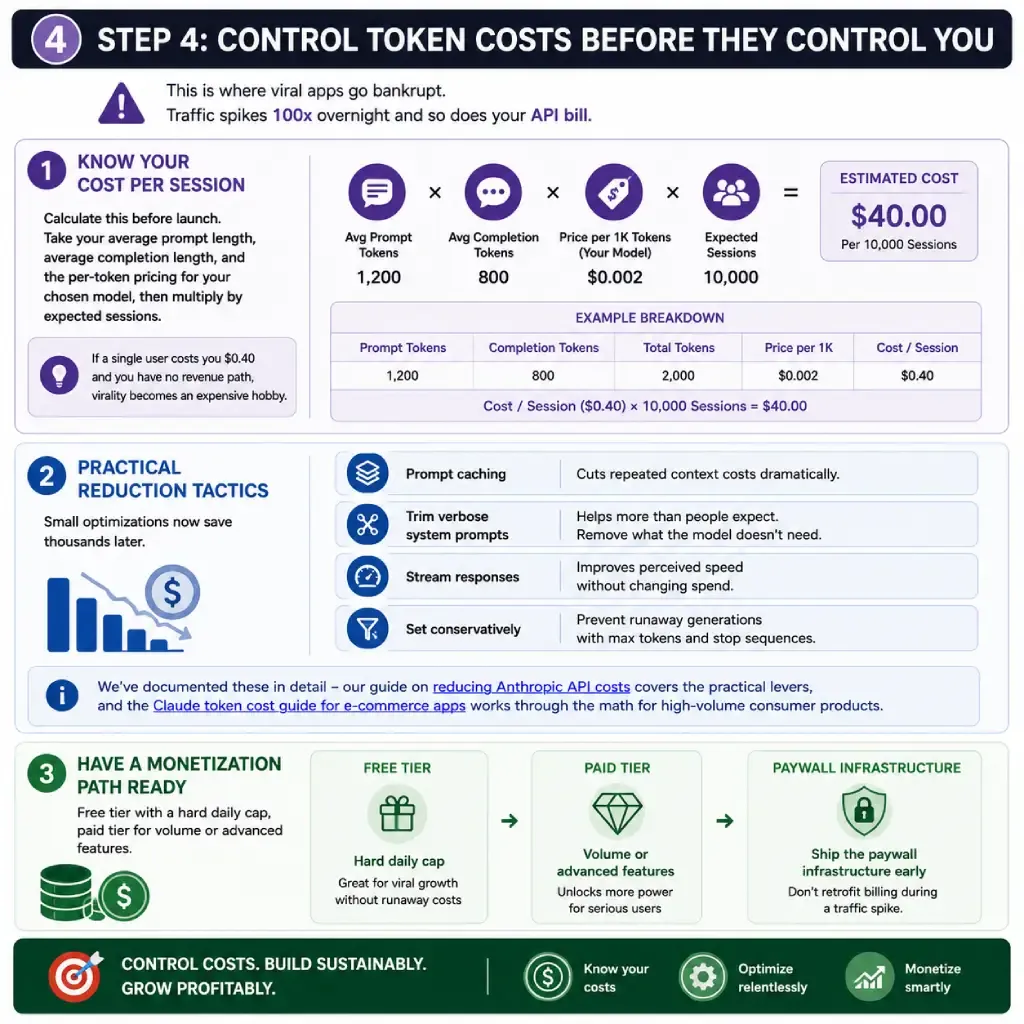
This is where viral apps go bankrupt. Traffic spikes 100x overnight and so does your API bill.
Know your cost per session
Calculate this before launch. Take your average prompt length, average completion length, and the per-token pricing for your chosen model, then multiply by expected sessions. If a single user costs you $0.40 and you have no revenue path, virality becomes an expensive hobby.
Practical reduction tactics
Prompt caching cuts repeated context costs dramatically. Trimming verbose system prompts helps more than people expect. Streaming responses improves perceived speed without changing spend. Setting conservatively prevents runaway generations.
We’ve documented these in detail – our guide on reducing Anthropic API costs covers the practical levers, and the Claude token cost guide for e-commerce apps works through the math for high-volume consumer products specifically.
Have a monetization path ready
Free tier with a hard daily cap, paid tier for volume or advanced features. Ship the paywall infrastructure before you need it, even if it’s switched off retrofitting billing during a traffic spike is miserable.
Step 5: Convert the Spike Into a Business
A viral moment lasts roughly 72 hours. What you do during it determines whether you have a company afterward.
Capture emails from the first session. Instrument everything so you know which acquisition channel actually converted. Have the next feature ready to announce while attention is still on you. And answer every support message personally during the spike those early users become your reference customers.
Frequently Asked Questions
How much does it cost to build a viral AI app using LLMs?
A functional MVP typically runs $2,000–$15,000 in development time if you’re outsourcing, or a few weekends if you’re building it yourself. Ongoing API costs depend entirely on usage — budget $0.01–$0.50 per session depending on model choice and prompt size.
Do I need to train my own model?
Almost certainly not. Prompt engineering, retrieval, and good product design get you 95% of the way for consumer applications. Fine-tuning makes sense once you have real usage data and a specific, repeated task where accuracy or cost justifies it.
What’s the fastest way to validate an AI app idea?
Build a landing page describing the output and collect emails for a week. If under 100 people sign up from a single organic post, the idea probably needs sharpening before you write code.
How do I stop my API bill from exploding if the app goes viral?
Set hard rate limits per user and per day, use the smallest model that handles the task, enable prompt caching, and configure spend alerts on your provider account before launch — not after.
Which LLM should I use for a consumer app?
Test at least two or three against your actual prompts. Latency and cost usually matter more than benchmark scores for consumer-facing products, since users abandon slow interfaces regardless of output quality.
Ready to Build?
The technical barrier to building with LLMs is effectively gone. What remains is product taste — knowing what to build, how to make it shareable, and how to keep it economically viable when it takes off.
If you’re weighing an AI product idea and want help pressure-testing the use case, architecture, or cost model before you commit engineering time, we’d be glad to talk it through. Start with the guides linked above, and reach out when you’re ready to move from concept to launch.
