
Today we’re exploring something that quietly solves one of the most persistent frustrations in collaborative software development: inconsistent code quality across teams.
Yes, we’re talking about CodeRabbit – the AI-powered code review tool that’s rapidly becoming a staple in development workflows everywhere. While you could rely solely on manual reviews and style guides that nobody reads after week two, we have something more practical to offer: a step-by-step CodeRabbit guide to maintain code quality at scale, even when your team is distributed, fast-moving, or growing faster than your review process can handle.
By the end of this guide, you’ll understand exactly how to use CodeRabbit, how to configure it for your specific project needs, and how to make AI-assisted reviews a natural part of your team’s pull request workflow.
Let’s get into it.
What Is CodeRabbit and Why Does It Matter for Team Projects?
Before diving into the how, let’s establish the what.
CodeRabbit is an AI-driven code review platform that integrates directly into GitHub, GitLab, and Bitbucket. It analyzes pull requests in real time, surfacing bugs, security vulnerabilities, logic issues, and style inconsistencies – all before a human reviewer even opens the diff.
What makes it genuinely useful for multi-developer teams isn’t just the automation. It’s the consistency. When you have five developers submitting PRs across three time zones, human reviewers naturally have varying standards, blind spots, and energy levels. CodeRabbit applies the same lens to every single commit.
According to teams that have adopted AI code review tooling, reviewer fatigue is one of the leading causes of defects slipping through in collaborative environments. CodeRabbit addresses this by acting as a tireless first-pass reviewer, so your senior engineers can focus on architecture decisions rather than catching missing null checks.
If you’re evaluating where AI fits into your development stack, our earlier breakdown of how to find the right AI development company covers the broader decision-making framework worth reading alongside this guide.
Setting Up CodeRabbit: Getting Your Team Started in Minutes
One of CodeRabbit’s strongest selling points is that setup genuinely takes under ten minutes. Here’s how to get your team onboarded without disrupting existing workflows.
Step 1: Connect Your Repository
Head to coderabbit.ai and sign in using your GitHub or GitLab account. Grant repository access to the projects you want monitored. CodeRabbit will request permissions to read PRs and post comments – nothing more invasive than that.
Step 2: Install the GitHub App or GitLab Integration
For GitHub users, install the CodeRabbit GitHub App from the marketplace and select which repositories it should monitor. For GitLab, you’ll configure a webhook integration from the CodeRabbit dashboard. Either way, the integration is non-destructive – it observes and comments, it doesn’t merge or modify anything automatically.
Step 3: Create Your .coderabbit.yaml Configuration File
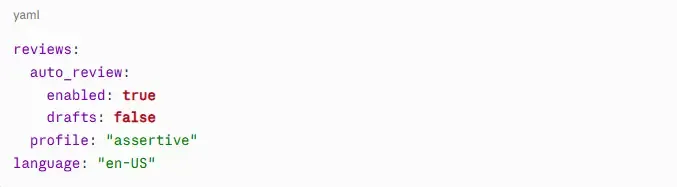
This is where most teams leave significant value on the table. Add a .coderabbit.yaml file to your repository root to customize how reviews behave. A minimal starting configuration looks like this:
The profile setting controls review intensity – chill for lighter feedback, assertive for thorough critique. For most multi-developer projects, assertive is the right call.
How to Use CodeRabbit Effectively Across a Multi-Developer Team
Getting the tool installed is the easy part. Getting your team to actually use it well requires a bit more intentionality.
Establish a Review Protocol That Includes CodeRabbit as the First Gate
One effective approach is to make CodeRabbit review completion a prerequisite before human reviewers are assigned. This means by the time your senior developer opens a PR, the obvious issues are already addressed. Your human reviewers can then focus on business logic, architectural concerns, and knowledge sharing.
This also reduces review friction for junior developers, who often feel uncomfortable receiving critical feedback from peers. An AI reviewer creates a psychologically safer space to iterate before entering the human review stage.
Use Inline Feedback to Drive Learning, Not Just Fixes
CodeRabbit posts inline comments directly on the diff. Encourage your team not to just dismiss these – use them as teaching moments. When CodeRabbit flags a potential race condition or a missing error boundary, that’s an opportunity for the author to understand why the pattern is problematic, not just that it needs fixing.
Configure Path-Specific Rules for Different Parts of the Codebase
If your project has both frontend and backend code, you can configure CodeRabbit to apply different rules depending on the file path. For example, stricter security review rules for API endpoints, and more style-focused feedback for UI components. This kind of granularity is what separates teams that get real value from the tool versus teams that treat it as a checkbox.
CodeRabbit Guide to Maintain Code Quality: Advanced Configuration Tips
Once your team is comfortable with the basics, these configurations significantly improve review quality.
Customize the Review Scope
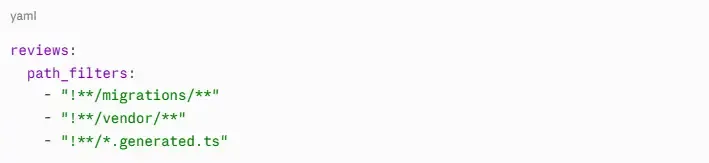
By default, CodeRabbit reviews everything in a PR. For large refactoring PRs, this can generate overwhelming feedback. Use path ignore patterns in your .coderabbit.yaml to exclude generated files, migration files, or vendor code:
Enable Sequence Diagram Generation
CodeRabbit can auto-generate sequence diagrams for complex function interactions when you enable this in settings. For teams working on API-heavy projects – especially those using frameworks like Livewire 4 for Laravel – this visual documentation feature alone saves hours of onboarding time for new developers joining the project.
Integrate with Your Issue Tracker
CodeRabbit supports linking flagged issues directly to Jira, Linear, and GitHub Issues. This creates a clean audit trail: if a vulnerability is identified in review, it becomes a tracked issue rather than a forgotten comment thread.
Real-World Benefits: What Teams Actually Experience
Let’s move beyond feature lists and talk outcomes.
Teams using AI-assisted code review consistently report three measurable improvements: faster PR cycle times, fewer defects reaching production, and reduced onboarding time for new developers. When code standards are enforced automatically, new team members can contribute confidently earlier because the guardrails are visible and immediate.
For teams building AI-powered products – similar to the workflows described in our guide on OpenAI Codex as an AI software engineer – CodeRabbit becomes particularly valuable. AI-generated code tends to have consistent structural patterns but can miss context-specific edge cases that CodeRabbit is well-positioned to catch.
There’s also a less obvious benefit: documentation pressure. When CodeRabbit flags an undocumented function or an ambiguous variable name, developers naturally get better at writing self-documenting code over time. The tool acts as a continuous style coach without requiring a dedicated code quality engineer on staff.
Common Pitfalls to Avoid When Using CodeRabbit
Even well-configured tools get misused. Here’s what to watch for.
Treating every CodeRabbit comment as a mandatory fix. Not every suggestion is equally important. Train your team to distinguish between critical flags (security issues, potential null pointer exceptions) and stylistic suggestions that may not apply to your context.
Skipping the configuration file. Default settings are a reasonable starting point, but they’re not calibrated to your project. Invest thirty minutes in your .coderabbit.yaml and it will pay dividends for months.
Using it as a replacement for human review. CodeRabbit is a first-pass tool, not a complete substitute. Complex business logic, architectural decisions, and cross-feature implications still require human judgment.
FAQ: Using CodeRabbit for Code Quality
Q: Is CodeRabbit suitable for small teams or solo developers? Yes – even solo developers benefit from CodeRabbit because it catches issues that are easy to overlook in your own code. For small teams, the consistency it provides outweighs any setup overhead.
Q: How does CodeRabbit handle sensitive code or proprietary logic? CodeRabbit processes your code to generate reviews but offers data privacy controls in paid plans. Review their data handling policy before enabling it on repositories with sensitive IP.
Q: Can CodeRabbit be configured to enforce our specific internal coding standards? Absolutely. Through the .coderabbit.yaml configuration and custom review instructions, you can direct CodeRabbit to flag patterns specific to your team’s conventions, not just generic best practices.
Q: Does CodeRabbit work with monorepos? Yes. Path-based configuration makes it particularly well-suited to monorepo structures where different packages may have different standards.
Q: What’s the difference between CodeRabbit’s free and paid plans? The free tier covers public repositories with core review functionality. Paid plans add private repository support, deeper integrations, higher usage limits, and more granular configuration options.
Conclusion: Make Code Quality a System, Not a Habit
Here’s the honest truth about code quality in multi-developer projects: it degrades the moment it depends on individual discipline rather than systematic enforcement. Style guides get ignored. Review standards drift. Senior developers get pulled into meetings and approvals happen too quickly.
CodeRabbit turns code quality from a cultural aspiration into an automated baseline. It won’t replace your best engineers – it frees them to do the work that actually requires their expertise.
If you’re already exploring how AI is reshaping development workflows, our piece on everything you need to know about NativePHP and our overview of AI-driven cost cutting in operations are both worth a read for broader context on where this technology is heading.
Start with a single repository, spend thirty minutes on your configuration file, and watch what your team’s PR quality looks like after two sprints. The results tend to speak for themselves.
Ready to raise your team’s code review standard? Set up CodeRabbit on your next active repository this week and share the .coderabbit.yaml template with your team as a starting point.
