
Imagine a world where you don’t have to face the moments of being stuck when you are developing something. Imagine a moment where you can just summon your personal software engineer, ready to take on all the challenges you provide them.
Well, you don’t have to imagine anymore because OpenAI did it for you.
Introducing Codex.
It is often described as an “AI software engineer” and is transforming the world of coding by helping developers generate code and by helping them translate regular natural language into programming logic.
Now you no longer need to be able to code in order to develop a program because you now have Codex.
So, what exactly is Codex? How does it work, and what kinds of benefits can it offer a developer? We will answer all these important questions in this blog. Let’s start with what Codex is.
What is OpenAI Codex?

Codex is basically a cloud-based software engineering agent that has been primarily designed with programming tasks in mind and can help you with everything from writing features to answering questions about your codebase and even fixing your bugs and much more. It is the best leap towards the direction of vibe coding yet.
It is powered by the codex-1 version of OpenAI o3 that has been specifically trained and optimised for software engineering with the help of reinforcement training on real-world coding tasks in a multitude of different environments.
This means that it is not only able to code but it is also able to mirror the human style and logic of coding, making it much more compatible with humans.
It is able to interpret any natural language prompts in simple English and it is able to convert those into functional code. This means that it can definitely be helpful for professionals, but it can be even more useful to a beginner who is trying to learn how to code and who just needs help.
It is actually the AI model behind GitHub Copilot and trained on huge volumes of code from public repositories, which definitely includes GitHub and it is also trained on multiple languages which includes:
- Python
- JavaScript
- Ruby
- Go
- C#
- TypeScript
- Java
- Shell scripting languages
- SQL and more
Codex shows a great deal of potential in coding evaluations and internal benchmarks, with a good level of performance.
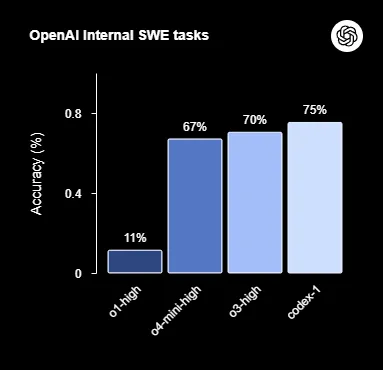
In these tests, codex-1 was primarily tested with a maximum context length of 192k tokens, along with the reasoning effort set to “medium”, and it still performed better than other models that are not tuned or optimised for coding.
What Can OpenAI Codex Actually Do?
OpenAI Codex is more than a code generator. It is an AI coding agent designed to help with real software engineering work. According to OpenAI, Codex can write code, understand unfamiliar codebases, answer questions about a repository, fix bugs, and help with review-ready changes. This makes it useful not just for developers starting a project, but also for teams maintaining large or legacy systems.
In day-to-day workflows, Codex can help with feature development, debugging, refactoring, documentation support, code explanation, test-related tasks, and pull-request-style outputs. That is a stronger and more current framing than presenting it only as a natural-language-to-code tool.
Keywords added naturally: AI coding agent, write code, understand unfamiliar codebases, fix bugs, code explanation, software engineering work, pull requests, refactoring
Codex Cloud Agent and Sandbox Environments
One of the most important keyword gaps in your blog is the concept of a cloud sandbox environment. OpenAI describes Codex as a cloud-based software engineering agent where each task runs in its own sandboxed environment, preloaded with the repository. This matters because it makes Codex more than an autocomplete assistant. It is built to execute real tasks in an isolated workspace rather than only suggest lines inside an editor.
This isolated execution model is especially relevant for businesses and engineering teams because it improves traceability, helps with testing workflows, and supports safer experimentation. It also gives you a strong way to target keywords like sandbox environment, cloud-based coding agent, repository context, and isolated execution that are missing or underused in your current post.
How Does Codex Work?

Codex is basically a natural language interface meant for programming and you can access it on the sidebar in ChatGPT, but you need to make sure that you have the Plus or the Pro subscription.
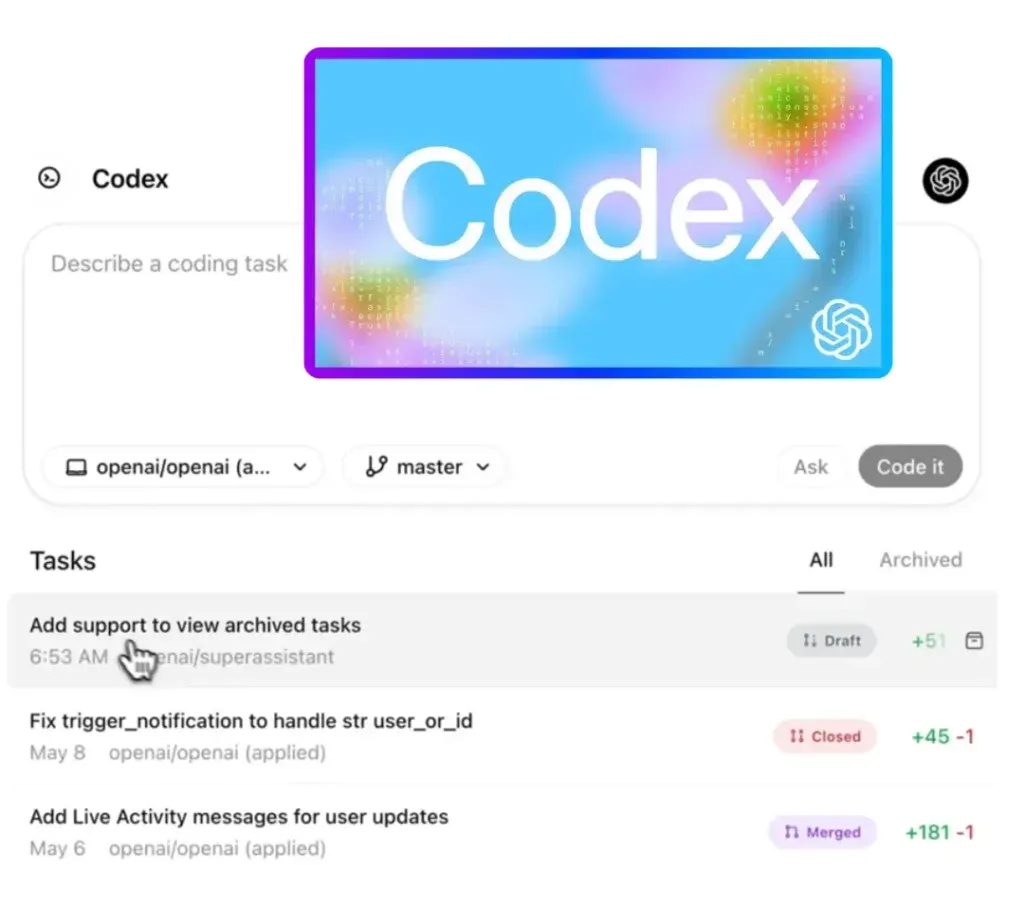
Once you do that, you can simply ask Codex to code for you with the help of simple prompts and you can simply click on “Code” and it will do it for you.
If you have questions regarding your codebase, then you can simply click “Ask” and tell it to do things and assign each task to it, which will be processed independently in separate isolated environments.
The best part about this assistant is that it can read and edit files and even run commands, including test harnesses, linters, and type checkers. You can get as creative as you want with it and the more detailed you are in your prompt, the better results you are going to get.
The results are fast as well; each task is going to take anywhere between 30 seconds to 2 minutes.
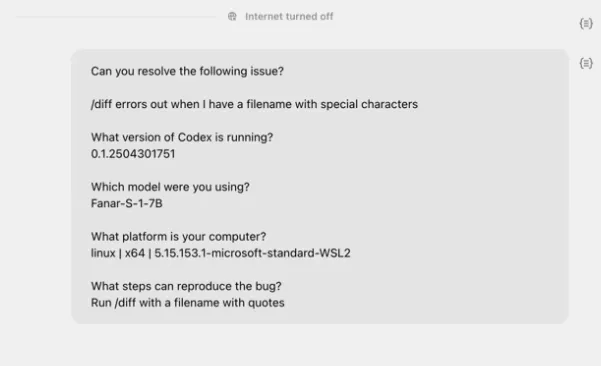
You can ask it to resolve issues and it will start working straight away.
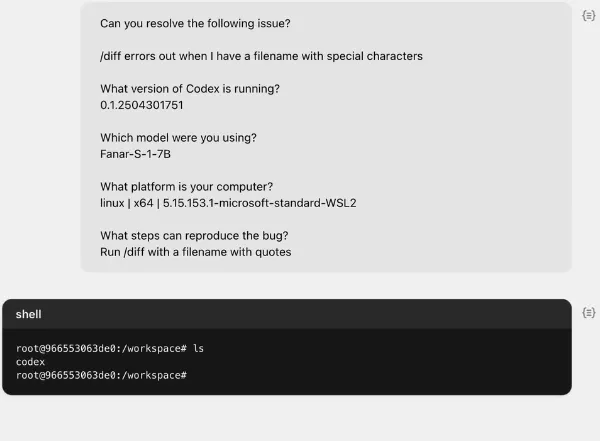
You can also guide it with the help of text files such as AGENTS.md files placed within your repository and it will simply help Codex navigate your codebase much better.
You must simply keep in mind that this AI software engineer is going to perform best when it is provided with configured development environments, just like human software engineers and it works best with clear documentation and reliable testing setups.
Codex CLI for Local Development Workflows
A major section missing from your blog is the Codex CLI. OpenAI’s public Codex repository describes Codex CLI as a coding agent that runs locally on your computer, which is a different workflow from the cloud-based Codex web agent. This is important because many developers now search for terms like Codex CLI, local coding agent, and terminal-based AI coding.
The Codex CLI is useful for developers who want more direct access to local files, terminal workflows, and hands-on development inside their existing environment. Adding this section makes your blog more complete and more aligned with how modern AI coding tools are actually being used in practice.
Codex App and Multi-Agent Workflows
Your current article does not mention the Codex app, which OpenAI introduced as a dedicated interface for managing multiple agents and collaborating over long-running tasks. OpenAI says the app is designed to help developers manage multiple agents at once and run work in parallel, which is a major product shift from the original “AI that writes code” framing.
This section is valuable because competitors and modern product pages increasingly focus on agent workflows, not just raw code generation. It also gives you room to add terms such as multi-agent workflows, parallel tasks, long-running tasks, and developer collaboration with AI agents.
Codex in IDEs and Existing Developer Tools
Modern Codex usage is not limited to the browser. OpenAI’s Codex CLI repository points users toward installing Codex in their IDE, and recent comparisons also describe Codex as available across multiple interfaces including ChatGPT, CLI, and IDE extensions. That means developers can work with Codex inside familiar environments instead of changing their entire workflow.
This is a strong SEO section because it targets practical intent. Many readers are not asking “What is Codex?” but “How do I use Codex in my real development stack?” Terms like IDE integration, developer environment, and existing workflow help capture that search demand.
Benefits of Using Codex
Increased Productivity
One of the most important benefits you can expect from using Codex is going to be a boost in productivity when it comes to coding tasks.
It will help you auto-complete code and write boilerplate code or even generate entire functions based on short prompts and this will simply allow you to focus on other important tasks such as high-level logic and much more.
Lower Barrier to Entry
Codex is extremely easy to use because you can basically write code with the help of natural language and this means that beginners with a very basic idea of code structure and utilise Codex.
What this ultimately does is that it democratizes programming for non-developers and for people who are just starting out and do not have very deep knowledge of syntax or language-specific rules.
Fewer Bugs and Faster Debugging
If you had a developer and you simply want someone to have a second look at your code and spot common bugs and fix them and even suggest improvements, then again, Codex is an excellent option for that, as it can result in much cleaner and more efficient code and improve code reliability.
Multilingual Code Generation
You do not have the limitation of a few programming languages because Codex supports almost all of them and definitely the most popular ones, which is going to allow teams to work across platforms.
This might also be helpful for someone trying out something new without needing any kind of deep expertise in the new language they are experimenting with.
Improved Learning and Onboarding
While Codex is excellent for professional settings but it can be even more helpful for students who are just starting to learn code and this is because Codex is generally an excellent platform for answers related to code.
You can ask an infinite number of “why”, “what-if”, “how”, “when”, “if this that what” questions to Codex and expect high-quality answers and generated code examples that can help you understand how everything works.
Rapid Prototyping
We all understand how taxing and time-consuming prototyping can be on a developer and that is where Codex shines because it can help you build MVPs, mockups, or interactive demos within minutes.
Enhanced Collaboration
Codex will ultimately open up the world of coding to everyone and not just developers and it will simply result in more interest in coding and help the entire community as a whole.
Codex will allow product managers and designers to contribute different ideas to a development project and it will just open up new areas of possibilities.
Best Use Cases for OpenAI Codex
To improve the blog’s usefulness and rankings, add a more concrete use-case section. Official and recent pages consistently position Codex for feature development, bug fixing, code review, repository Q&A, unfamiliar codebase understanding, and long-horizon engineering work.
Good real-world use cases include:
- building new features faster
- debugging and fixing regressions
- reviewing or preparing pull requests
- explaining legacy codebases
- refactoring older code
- helping with migrations
- supporting web app and frontend work
- working across multiple tasks in parallel
Codex vs GitHub Copilot and Claude Code
This is one of the highest-value missing comparison sections. Competitor coverage increasingly positions Codex against GitHub Copilot and Claude Code. A current comparison notes that Claude Code is more focused on developer-in-the-loop local workflows, while Codex is designed for both local and autonomous cloud-based task delegation. That distinction is useful for readers deciding which tool fits their engineering process.
You do not need to overdo this section. A simple positioning works well: GitHub Copilot is widely known for inline assistance, Claude Code is strong in interactive local workflows, and Codex stands out when teams want a broader agentic coding workflow across cloud, CLI, and IDE surfaces.
Best Practices for Using Codex Effectively
Your current post says Codex works best with configured environments, clear documentation, and reliable testing. That is good, but you can expand it into a more SEO-friendly best-practices section. OpenAI and tutorial-style pages emphasize structured prompts, clean repository context, and review-oriented usage. Some guides also highlight files like AGENTS.md for steering behavior in repo-based workflows.
You can frame the section like this: to get better results from Codex, teams should provide clear task definitions, maintain readable documentation, keep tests reliable, use well-structured repositories, and review generated code before merge. This adds highly practical value and supports commercial trust.
Limitations of OpenAI Codex
A stronger competitor-style article should include limitations. Even though Codex can automate a lot, it still needs human oversight for architecture decisions, security-sensitive changes, production validation, and final review. OpenAI’s own framing emphasizes collaboration and steering, not fully unsupervised deployment.
Adding this section helps with trust and brings in keywords like limitations of Codex, human review, code validation, and engineering oversight, which often improve comparison-page quality.
Access, Plans, and Current Model Options
This is another freshness gap. OpenAI’s developer page says Codex is included in ChatGPT Plus, Pro, Business, Edu, and Enterprise plans. OpenAI’s models page also says that for most tasks in Codex, users should start with gpt-5.4, while gpt-5.4-mini is a faster lower-cost option and gpt-5.3-codex-spark is available in research preview for near-instant coding iteration.
This section is especially valuable because people actively search for Codex pricing, Codex access, and which model Codex uses. Your current blog still references older launch-era model framing, so this update will make it much more current.
We hope this blog has been helpful for you to understand how amazing Codex is and how it can be utilised.
As of now, Codex is powering GitHub Copilot and is also being utilised by data analysts throughout the world and it is also helping build chatbots. Along with that, educational platforms are very keen on introducing Codex to help students learn code.
If you are someone willing to integrate Codex into your educational platform, or if you are someone looking for experienced opinions regarding Codex and also any kind of programming-related development needs, we are here for you.
We are Think To Share, and we are one of the most renowned names in the industry for our IT acumen and we would love to help you out regarding all your programming needs.
