
Every development team faces the same tension: clients want features delivered yesterday, but rushing code into production is how bugs slip through and trust gets damaged.
That’s the exact problem we set out to solve when we standardized our workflow around GitLab CI/CD. What started as an internal experiment turned into one of the most impactful changes we’ve made to how we build and deliver software for clients.
In this GitLab CI/CD guide, we’ll walk you through exactly how we use it – not in theory, but in practice. You’ll learn how we structure our pipelines, where automation saves us the most time, and how this approach has meaningfully shortened delivery timelines across projects of different sizes and tech stacks.
Whether you’re a developer evaluating CI/CD tools, a team lead trying to reduce deployment friction, or a decision-maker wondering why your builds are still a manual process, this guide is for you.
What Is GitLab CI/CD and Why Does It Matter?
Before diving into the how, let’s be clear on the what.
GitLab CI/CD is GitLab’s built-in continuous integration and continuous delivery system. It lets you define automated workflows – called pipelines – that trigger whenever code is pushed to a repository. These pipelines can run tests, build applications, scan for security vulnerabilities, and deploy code to staging or production environments, all without a human manually clicking through steps.
The “CI” (Continuous Integration) part means every code change is automatically tested and validated before it merges. The “CD” (Continuous Delivery or Deployment) part means once code passes those checks, it can be delivered to environments automatically or with a single approved click.
Why does this matter for clients? Because the traditional alternative – manual QA queues, deployment checklists, back-and-forth between dev and ops – introduces delays at every step. CI/CD collapses those delays dramatically.
How We Structure Our GitLab Pipelines
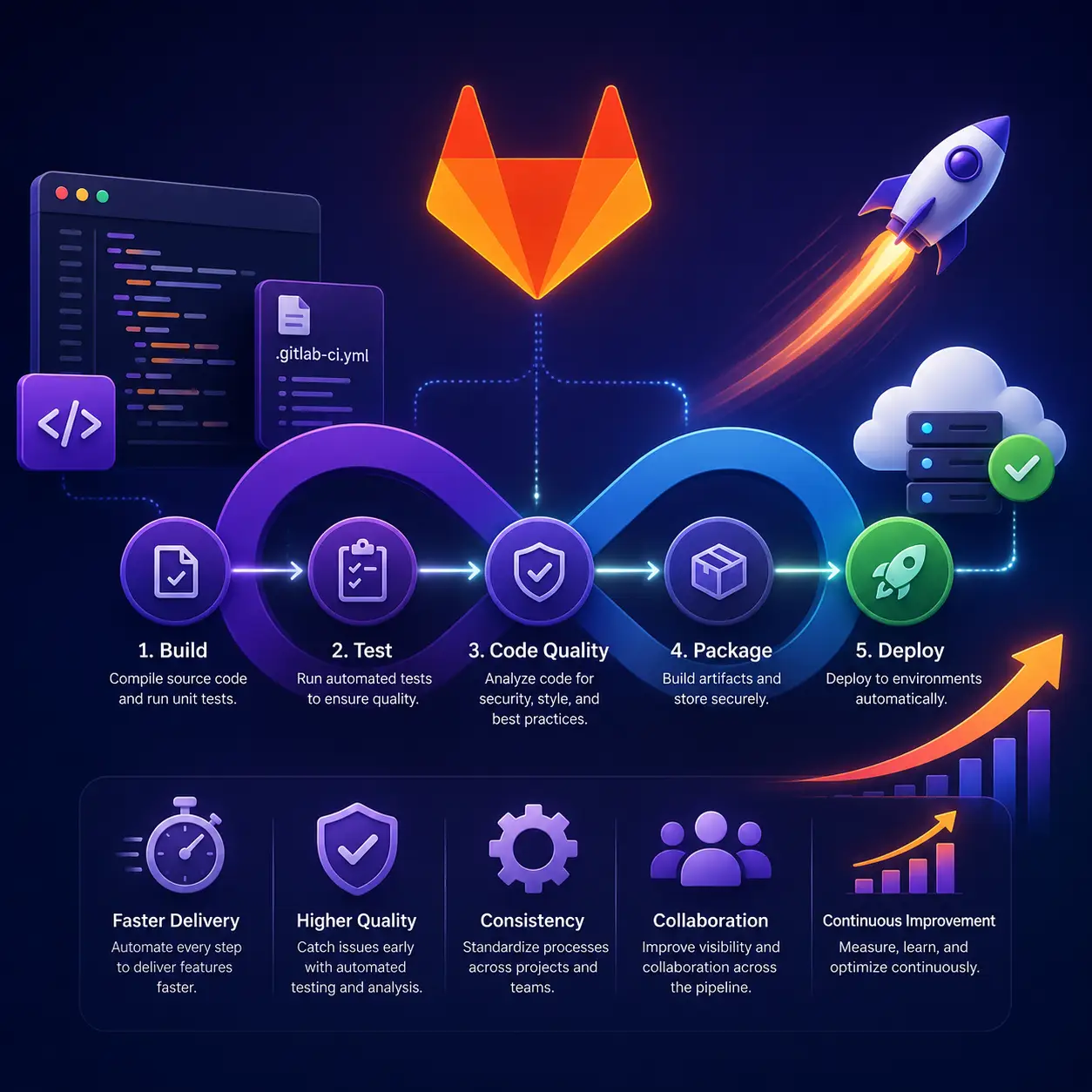
The foundation of how to use GitLab CI/CD effectively is a well-structured .gitlab-ci.yml file. This file lives in the root of your repository and defines every stage of your pipeline.
Our Core Pipeline Stages
We typically organize our pipelines into four stages:
- Build- Compile the application, install dependencies, and create build artifacts. This catches obvious errors early before any testing begins.
- Test- Run unit tests, integration tests, and linting checks in parallel. Parallelizing here is a significant time saver; instead of tests running sequentially for 20 minutes, parallel jobs can compress that to 6-8 minutes.
- Security Scan- GitLab has built-in SAST (Static Application Security Testing) and dependency scanning. We run these automatically so security isn’t an afterthought tacked onto the end of a sprint.
- Deploy- Automated deployment to staging on every merge to the developbranch, and a one-click approved deploy to production from main. No SSH sessions, no manual uploads.
This structure means that by the time a developer’s code is reviewed and merged, it has already been compiled, tested, scanned, and is ready to deploy. The human review step is the bottleneck, not the infrastructure.
The Specific Ways GitLab CI/CD Shortens Delivery Timelines
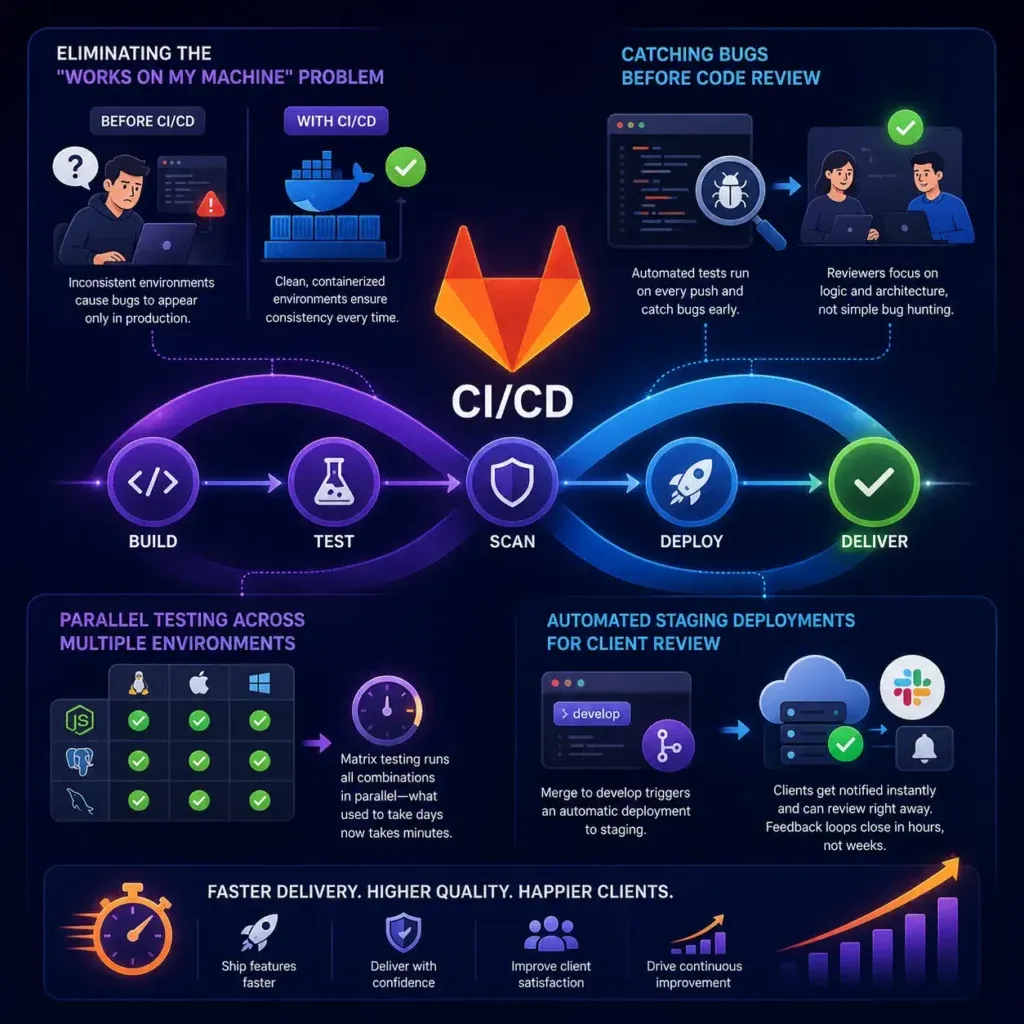
This is the core of our GitLab CI/CD guide – the tangible time savings we’ve seen and how they’re achieved.
Eliminating the “Works on My Machine” Problem
Before CI/CD, we occasionally spent hours debugging issues that only appeared in production because a developer’s local environment had a slightly different configuration. GitLab’s pipelines run in clean, containerized environments (we use Docker images). Every build is consistent. That class of problem essentially disappears.
Catching Bugs Before Code Review
When automated tests run on every push, code reviewers aren’t discovering bugs – they’re evaluating logic and architecture. This makes code reviews faster and more focused. Reviewers stop being a second QA pass and start being an actual quality gate for design decisions.
Parallel Testing Across Multiple Environments
For clients with applications that need to support multiple environments (different Node.js versions, different database configurations), we use GitLab’s matrix strategy to run tests across all combinations simultaneously. What used to be a multi-day manual compatibility check is now part of the standard pipeline.
Automated Staging Deployments for Client Review
One of our most client-appreciated workflows: every merge to the develop branch auto-deploys to a staging environment. Clients get a Slack notification (via a GitLab webhook) that a new version is ready for review. They can test the feature the same day it’s developed. Feedback loops that used to span a week now close in hours.
If you’re working through your own AI-driven digital transformation, embedding CI/CD into your delivery workflow is one of the highest-leverage moves you can make early on.
Setting Up GitLab CI/CD: Our Practical Starting Point
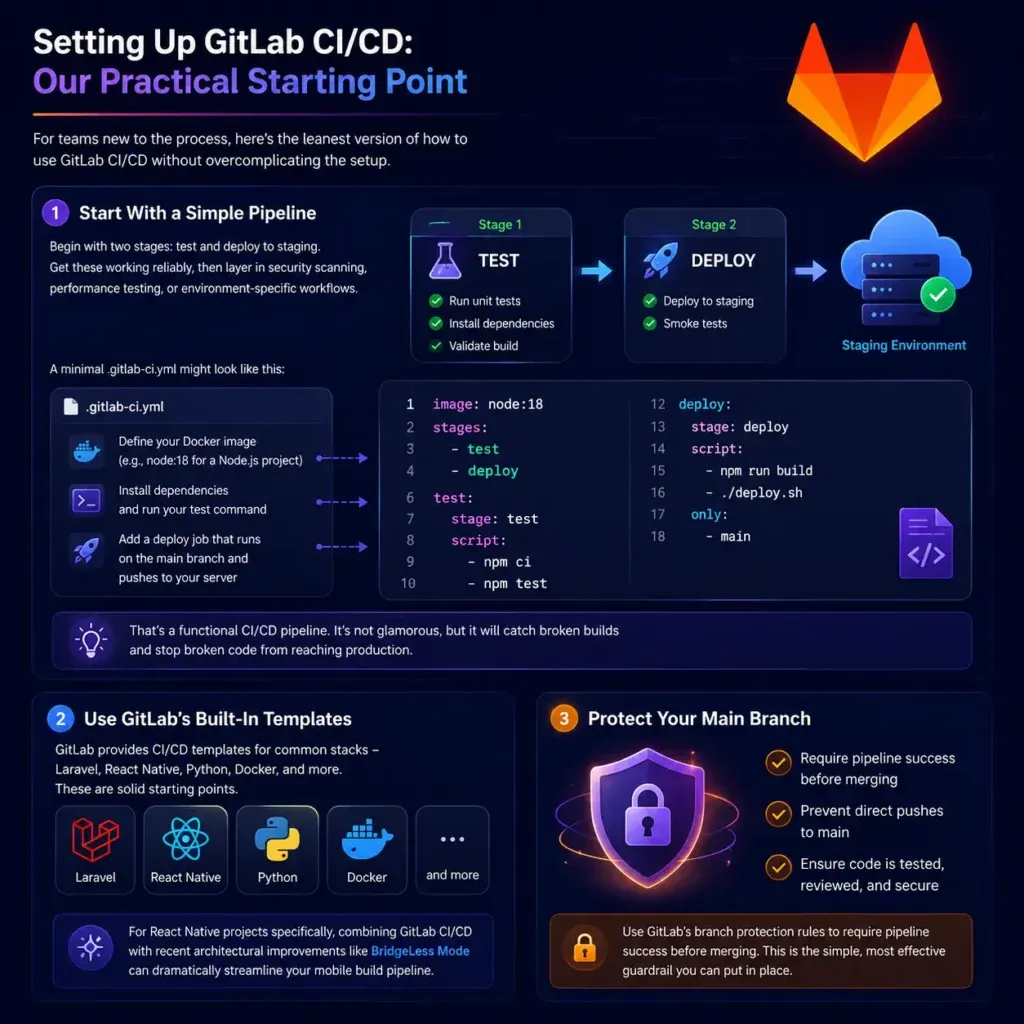
For teams new to the process, here’s the honest version of how to use GitLab CI/CD without overcomplicating the setup.
Start With a Simple Pipeline
Don’t try to build the perfect pipeline on day one. Begin with two stages: test and deploy-to-staging. Get those working reliably, then layer in security scanning, performance testing, or environment-specific workflows.
A minimal .gitlab-ci.yml might look like this in plain terms:
- Define your Docker image (e.g., node:18for a Node.js project)
- Add a testjob that installs dependencies and runs your test command
- Add a deployjob that only runs on the main branch and pushes to your server
That’s a functional CI/CD pipeline. It’s not glamorous, but it will catch broken builds and stop broken code from reaching production.
Use GitLab’s Built-In Templates
GitLab provides CI/CD templates for common stacks – Laravel, React Native, Python, Docker, and more. These are solid starting points. For React Native projects specifically, combining GitLab CI/CD with recent architectural improvements like Bridgeless Mode can dramatically streamline your mobile build pipeline.
Protect Your Main Branch
Use GitLab’s branch protection rules to require pipeline success before merging. This is the single most effective guardrail you can put in place. It makes “nothing broken gets to production” a structural rule, not a cultural expectation.
Integrating GitLab CI/CD With the Broader Tech Stack
GitLab CI/CD doesn’t operate in isolation. Its real value multiplies when it connects with the rest of your development ecosystem.
We regularly integrate pipelines with:
- Docker and container registriesfor consistent build artifacts
- Kubernetesfor scalable, automated production deployments
- Slack and emailfor deployment notifications and failure alerts
- Code quality toolslike SonarQube or ESLint for automated reporting
- Package managers and AI-adjacent libraries- for example, teams using Laravel packages for AI development can automate package validation and compatibility checks directly in the pipeline
If your organization is evaluating whether to build internal AI tooling or partner externally, having a robust CI/CD workflow already in place is a key indicator of delivery maturity – something any AI development company worth partnering with will look for.
Common Mistakes Teams Make With GitLab CI/CD (And How to Avoid Them)
No GitLab CI/CD guide is complete without addressing where teams go wrong.
Running everything sequentially when jobs can be parallel. GitLab supports concurrent jobs natively. Use it. Parallel test execution alone can cut pipeline time by 50–70%.
Not caching dependencies. If your pipeline reinstalls all npm or Composer packages from scratch on every run, you’re wasting minutes per pipeline. GitLab’s cache configuration lets you persist these between jobs and branches.
Ignoring failed pipelines. Some teams configure CI/CD and then ignore red pipelines because “it’s probably a flaky test.” This erodes trust in the system fast. Fix broken tests immediately, or the pipeline becomes background noise.
Over-engineering the first pipeline. A pipeline with 15 stages, custom runners, and environment-specific configurations is hard to maintain and harder to debug. Start simple. Complexity should earn its place.
No pipeline for infrastructure changes. If your application pipeline is solid but infrastructure-as-code changes are still deployed manually, you have a gap. Treat your Terraform or Ansible files like application code – they belong in the pipeline too.
FAQ: GitLab CI/CD Guide
Q: Is GitLab CI/CD suitable for small teams or solo developers?
Absolutely. Even a two-person team benefits from automated testing and one-click deployments. The setup investment is low, and the protection against production incidents pays off quickly. GitLab’s free tier includes CI/CD capabilities, making it accessible without budget concerns.
Q: How is GitLab CI/CD different from GitHub Actions?
Both are solid CI/CD platforms, but GitLab CI/CD is more tightly integrated with GitLab’s full DevOps toolchain — including issue tracking, security scanning, container registry, and deployment environments — all in one platform. GitHub Actions has a larger marketplace of third-party actions. The right choice depends on your existing ecosystem.
Q: How long does it take to set up a working GitLab pipeline?
A basic working pipeline for a standard web application can be configured in under an hour using GitLab’s built-in templates. A production-grade pipeline with parallel testing, environment deployments, and security scanning typically takes one to three days of focused setup and tuning.
Q: Can GitLab CI/CD handle mobile app deployments?
Yes. With the right runners and tooling, GitLab can build and distribute iOS and Android applications, including triggering app store submissions. It pairs well with tools like Fastlane for mobile-specific deployment automation.
Q: What if our pipeline keeps failing on the same test?
First, check whether the test itself is flaky (passes and fails intermittently) versus genuinely broken. For flaky tests, GitLab supports retry logic at the job level. For broken tests, the pipeline is doing its job — don’t bypass it. Fix the underlying code or test, then merge.
Conclusion: CI/CD Is a Delivery Strategy, Not Just a Dev Tool
The biggest mindset shift our team made was treating GitLab CI/CD not as a developer convenience, but as a core part of how we deliver value to clients. When pipelines are reliable and fast, developers ship with more confidence, clients see progress faster, and the gap between “code written” and “feature live” shrinks from weeks to days.
If your team is still relying on manual deployments, undocumented release processes, or “someone will manually test it” as a QA strategy, this GitLab CI/CD guide is your starting point – not the final word.
Start with a simple pipeline. Run your tests automatically. Deploy to staging on every merge. Protect your main branch. Then build from there.
Ready to rethink how your team delivers software? Our team at ThinkToShare works with development teams to implement CI/CD workflows that fit the actual complexity of their projects – not just template configurations. Get in touch to talk through what a faster, more reliable delivery process could look like for your team.
